


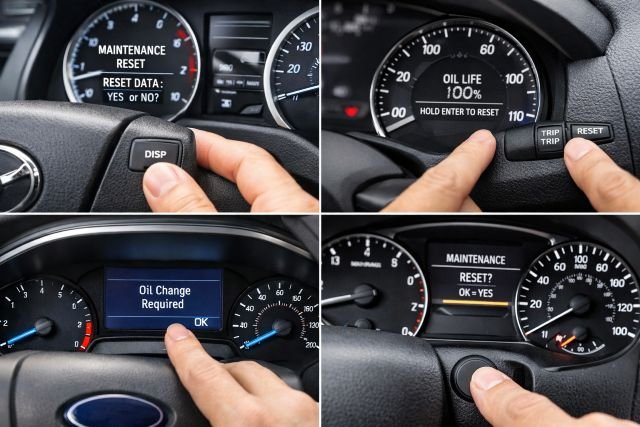
If you just changed your oil (or had it changed) and the dashboard reminder is still on, you’re not alone. Learning how to reset oil light notifications is a simple maintenance step that keeps your service tracking accurate, especially on vehicles that calculate oil life based on driving conditions instead of a fixed mileage number.
- Before you reset the oil light
- How to reset oil light on most cars
- How to reset oil light on Toyota
- How to reset oil light on Honda
- How to reset oil light on Ford
- How to reset oil light on Nissan
- How to reset oil light on more brands
- Why your oil light won’t reset
- After-reset checks that prevent repeat reminders
- Frequently asked questions about oil light resets
- Conclusion
Resetting matters because many modern systems don’t just count miles. They estimate oil life using factors such as engine temperature, trip length, and driving style, then trigger a reminder when the system believes the oil is near the end of its useful life. Ford is very clear that the oil-life system should be reset only after you change the engine oil and oil filter.
Before you reset the oil light
Only reset the oil reminder after an oil change. If you reset it without changing the oil, the reminder becomes inaccurate and you can unintentionally run the engine beyond a safe service interval. Preventive maintenance matters, and AAA has noted that a large share of drivers skip or delay recommended service, which can increase breakdown risk.
Also, make sure you’re dealing with an oil-life or maintenance reminder and not a low oil pressure warning. An oil-life reminder is a schedule-based notification that can be reset after service. A low oil pressure warning, often red, can indicate an urgent lubrication issue and should not be cleared as a workaround.
How to reset oil light on most cars
Most vehicles use one of four reset styles. Some use an instrument-cluster button hold, common on older dashboards. Many newer cars use steering-wheel controls and a settings menu inside the driver display. Some Ford models use a pedal-based reset sequence. Other vehicles place the reset inside infotainment menus under service or maintenance.
If your first attempt doesn’t match what you see, that usually means your car uses a different reset style for the same reminder, or it separates oil service from other maintenance items such as tire rotation and inspections.
How to reset oil light on Toyota
Toyota often labels this reminder as “MAINT REQD” or “Maintenance Required.” On many models, the reset is done through the odometer and trip button, and you’ll often see a countdown or dashed lines while the system clears the reminder. Toyota dealer service guidance describes a similar odometer-based reset procedure on models that display the maintenance required light.
Start by turning the ignition to ON with the engine off. Use the ODO/TRIP button to display the odometer or Trip A, depending on your model. Turn the ignition off. Press and hold the ODO/TRIP button, then turn the ignition back to ON while continuing to hold. Keep holding until the display indicates the reset is complete and the reminder goes off.
On newer Toyotas with a multi-information display, the reset is often inside Settings or Vehicle Settings under Maintenance System. You may see options labeled Oil Maintenance, Scheduled Maintenance, or Maintenance Reset. Select the oil item and confirm reset.
Toyota reset tip that saves time
If you changed oil early, some systems still let you reset without waiting for the reminder to appear. The key is to reset the oil maintenance item, not a different service category.
How to reset oil light on Honda
Honda commonly uses the Maintenance Minder system, which shows an oil life percentage and sometimes service codes. When you reset it after an oil change, the oil life returns to 100% so the system can track the next interval correctly. Honda service and parts guidance describes a press-and-hold reset process on the oil life display.
Turn the ignition to ON with the engine off. Navigate until you see the oil life percentage screen. Press and hold the Select/Reset knob or button until the oil life starts flashing. Release, then press and hold again until the oil life resets to 100%.
If your Honda shows service codes such as A or B with numbers, those codes reflect the service type the car believes is due. Clearing oil life does not always clear every maintenance indicator if other services were also due. Dealer explainers and Honda-focused service references commonly note that the Minder system can track multiple service items and display reminders accordingly.
How to reset oil light on Ford
Ford’s official guidance emphasizes that you reset the oil-life monitor only after changing the engine oil and oil filter. Some Ford vehicles use a pedal-based procedure, while others use menu-based resets in the instrument cluster.
For the pedal method, turn the ignition on with the engine off. Press and hold the brake and accelerator pedals at the same time. Keep both fully pressed until the display confirms the reset is complete. This method is documented in Ford’s owner/manual service information for certain models.
For the menu method used in many newer Ford clusters, open Settings in the instrument panel, then look for Vehicle or Oil Life, and select Reset. Ford’s support pages guide owners to the correct oil-life reset steps depending on the vehicle’s display layout.
If your reset works but the message quickly returns, it can indicate the system didn’t register the reset sequence, or you exited too early before the confirmation appeared. It can also happen if the car has another maintenance or engine warning that looks similar at a glance.
How to reset oil light on Nissan
Nissan often places oil reminders under the driver display settings, typically labeled Maintenance, Oil & Filter, or Service. Dealer and service guides commonly describe a settings-based path where you enter Maintenance, select Oil & Filter, then choose Reset or adjust the interval.
Turn the ignition to ON with the engine off. Use your steering-wheel buttons to open Settings on the driver information display. Find Maintenance, then choose Oil & Filter, and select Reset. Some Nissans let you set a mileage interval. If you drive in severe conditions such as frequent short trips, heavy traffic, extreme heat, or towing, using a shorter interval can make the reminder more realistic for your driving.
How to reset oil light on more brands
Many Chevrolet and GMC models reset oil life through the instrument cluster menu under Settings, Vehicle, then Oil Life and Reset. Some older GM dashboards used a rapid pedal sequence, but newer models are more consistently menu-based.
Hyundai and Kia commonly place the reset under User Settings, Service Interval, then Reset. Depending on year, it may appear under Cluster or Convenience.
Volkswagen and Audi often separate oil service from inspection service. You may see “Oil service reset” and “Inspection reset” as separate items. Resetting the wrong one can throw off your maintenance planning, so it’s worth double-checking which reminder is actually on.
BMW and Mercedes-Benz typically require entering a service menu on the instrument cluster. Many models allow the oil reset, but some conditions or prompts are model-specific, and certain resets can be blocked if the system believes service is not yet due.
Why your oil light won’t reset
One of the most common reasons is that you’re resetting a different maintenance category than the one that’s active. Many cars track oil service, inspection service, and tire rotation separately.
Another frequent issue is ignition mode. Some vehicles require the dash to be fully on, not just accessory mode. If the screen is only partially lit or your infotainment hasn’t booted, the reset option may not appear or may not save.
Timing also matters. On Honda and Toyota-style resets, you often need to hold the button long enough for the display to flash, change, or show a confirmation. If you release too soon, nothing will actually reset.
Finally, confirm the symbol you’re seeing. An oil-life reminder is not the same as a low oil pressure warning. If it’s an oil pressure alert, the correct response is to check oil level, look for leaks, and seek service rather than clearing the warning.
After-reset checks that prevent repeat reminders
Once the reminder clears, verify the basics. Check the oil level after the engine has rested a few minutes on level ground if your vehicle has a dipstick. Confirm the oil cap is secure and look for seepage around the filter area.
It also helps to note the mileage and date of service, even if your car has an oil-life monitor. Oil change intervals can vary depending on oil type and driving conditions, and many reputable automotive sources emphasize following the manufacturer’s maintenance schedule for your specific engine.
Frequently asked questions about oil light resets
How do I reset my oil light after an oil change?
Turn the ignition on with the engine off, open the oil life or maintenance screen, then use the reset command for the oil item. Some cars require a press-and-hold confirmation, while others use a settings menu reset.
Can I reset the oil light without changing the oil?
You can, but it’s not recommended because it breaks the accuracy of the reminder system. Ford specifically notes that the oil-life system should be reset only after changing oil and filter.
Why is my oil light still on after I reset it?
This usually happens when you reset the wrong maintenance item, the ignition wasn’t fully on, or you released the button before the confirmation. It can also happen if the vehicle is showing a different warning, such as oil pressure, that should not be cleared.
Is the oil life monitor accurate?
Oil-life monitors can be more useful than fixed-mile reminders because they account for driving conditions. Ford’s Intelligent Oil-Life Monitor system includes defined reset procedures and vehicle-specific guidance, which is a good model for how these systems are intended to be used.
How often should I change oil if I use synthetic?
Intervals vary by vehicle and driving. Many modern recommendations allow longer intervals with full synthetic, but the safest approach is to follow your manufacturer’s schedule and your car’s oil-life system if equipped.
Conclusion
You now know how to reset oil light reminders on Toyota, Honda, Ford, Nissan, and other common makes. The most important takeaway is to reset only after the oil change, follow the reset method that matches your dashboard design, and confirm you’re clearing an oil-life reminder rather than an oil pressure warning. Ford’s guidance captures the spirit of this perfectly: reset the monitor after you change the oil and filter so the system can correctly track the next service interval.